
Hands-free calling cuts down on manual and visual distraction, but it does not remove the cognitive load that pulls your brain off the road, and crash risk stays meaningfully elevated either way. Most laws ban handheld phone use while permitting hands-free, which is a legal distinction, not a safety verdict. The evidence below explains why, along with steps you can use today to drive more safely.
TL;DR:
- Hands-free calling still imposes significant cognitive distraction, which keeps crash risk nearly as high as handheld phone use, at about four times the normal risk.
- Most laws ban handheld use while permitting hands-free, but the legal allowance does not confirm safety, as mental distraction persists during hands-free conversations.
- Using voice commands or built-in systems often requires manual intervention or visual confirmation, reintroducing distraction despite the “hands-free” label.
- Pre-setup and pulling over before using a phone drastically reduce distractions, while trying to multitask on the road significantly increases crash likelihood.
- Drivers’ perception of safety with hands-free systems is misleading, encouraging longer conversations that tax attention and elevate crash risk.
Table of Contents
- What research and agencies say about crash risk and distraction
- How laws typically treat handheld and hands-free use
- What counts as handheld and hands-free, and where they fail
- Actionable rules to reduce distraction when you must use a device
- Drive With Care’s approach to changing driver behavior
- Comparing hands-free audio calls with hands-free texting or apps
- Why hands-free feels safer than it actually is
- What drivers should actually prioritize
- Support safer roads with Drive With Care
- Sources
- FAQ
What research and agencies say about crash risk and distraction
The clearest signal comes from the World Health Organization, which finds that using a mobile phone while driving makes a crash about four times more likely, and that this risk looks similar whether the phone is handheld or hands-free. The reason is cognitive distraction: your brain divides attention on a call regardless of where your hands are.
Distraction breaks down into three overlapping types, and each carries its own weight:
- Manual distraction takes a hand off the wheel, as with dialing or texting.
- Visual distraction pulls your eyes off the road, as with reading a screen.
- Cognitive distraction occupies your thinking even when your eyes and hands stay put, as with a phone conversation.
Texting combines all three, which is why NHTSA treats it as one of the most dangerous behaviors behind the wheel.
Reading or sending a text takes your eyes off the road for about 5 seconds, and at 55 mph that’s roughly the length of a football field driven without looking, according to NHTSA.
Hands-free does not fully solve the problem. NHTSA-funded naturalistic driving research found that drivers on hands-free calls still glance away from the road frequently, and voice-dialing often fails outright, prompting drivers to reach for the handset anyway. Mental distraction also lingers: reporting on hands-free use describes a mental “hangover” that can last up to a brief period after a call ends, during which situational awareness stays reduced even though the conversation is over.
How laws typically treat handheld and hands-free use
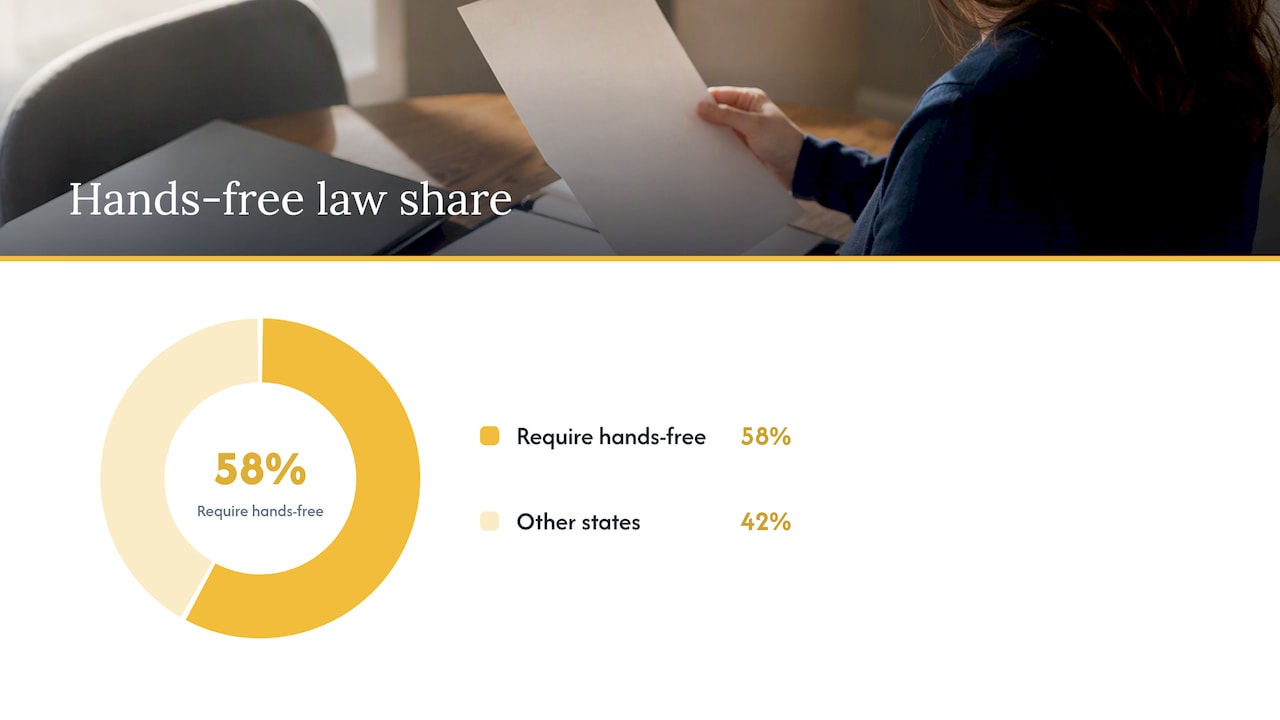
Most jurisdictions restrict handheld phone use while allowing hands-free, but the details vary enough that drivers should never assume one state’s rules apply next door. As of 2026, 30 of the 51 U.S. states and Washington, D.C. require hands-free use for mobile phones, while other states focus narrower bans on texting or handheld dialing specifically.
A few patterns show up repeatedly across statutes:
- Mounted device rules often specify where a phone can sit and how much you can touch it while driving.
- Texting bans are close to universal even in states without full handheld bans.
- Work zones frequently carry stricter distraction rules, sometimes banning any phone use.
- Commercial drivers face separate, often tighter federal restrictions than passenger vehicle drivers.
The practical takeaway is simple: check your local statute before assuming hands-free is fine everywhere, and never treat legal permission as proof of safety — guidance on having these crucial conversations can be found in how to tell mom or dad they can’t drive anymore. Laws set a floor, not a ceiling, on how carefully you should drive.
What counts as handheld and hands-free, and where they fail
Three categories cover most of what’s on the road today. A hand-held (HH) phone is one you physically hold to talk, text, or dial. A portable hands-free (PHF) setup, like a Bluetooth headset or speakerphone app, lets you talk without holding the device but still requires some manual setup. An integrated hands-free (IHF) system is built into the vehicle, using steering-wheel controls or voice commands through the infotainment screen.
The trouble is that these categories blur in practice:
- Drivers frequently start a call hands-free, then pick up the phone mid-conversation to check a text or fix a bad connection.
- Voice-dialing and voice assistants often misfire in a noisy cabin, forcing manual intervention that undoes the hands-free benefit.
- Even flawless voice systems don’t stop the brain from splitting attention, so glance behavior and reaction times still suffer during the call.
- The mental hangover after hanging up means situational awareness stays lower for a stretch of driving with no phone in sight at all.
Actionable rules to reduce distraction when you must use a device
Most distraction risk comes down to timing and setup, not willpower. Handle these before you start driving, not during:
- Pair your phone, set your route, and silence notifications before you shift into gear.
- Preload frequent contacts so a call takes one voice command, not several.
- Use short, single-step voice commands only. Save anything requiring reading, typing, or multiple replies for later.
- Pull over for any task that needs sustained visual or manual attention, including texts you can’t dictate cleanly.
- Choose mounted or integrated systems over handheld setups whenever you have the choice, since they cut down on reach and glance distance.
Pro Tip: Skip phone conversations entirely in heavy traffic, bad weather, or while using partial driving automation, since those are exactly the moments your attention has the least room to spare.
Drive With Care’s approach to changing driver behavior
A nonprofit organization focused on reducing traffic injuries and deaths through education and survivor support. Its “Safer Roads Now” initiative targets human error, which contributes to the overwhelming majority of crashes, by combining data analysis with personal stories from people directly affected by distracted driving.
- The organization runs a pledge program built around concrete, personal commitments to safer driving habits.
- It partners with driving schools and local agencies to bring distraction education directly to new and experienced drivers.
- Its approach leans on survivor stories and community engagement alongside data, on the premise that behavior change sticks better when it’s personal.
Readers who want to go deeper can find more on the resources page.
Comparing hands-free audio calls with hands-free texting or apps
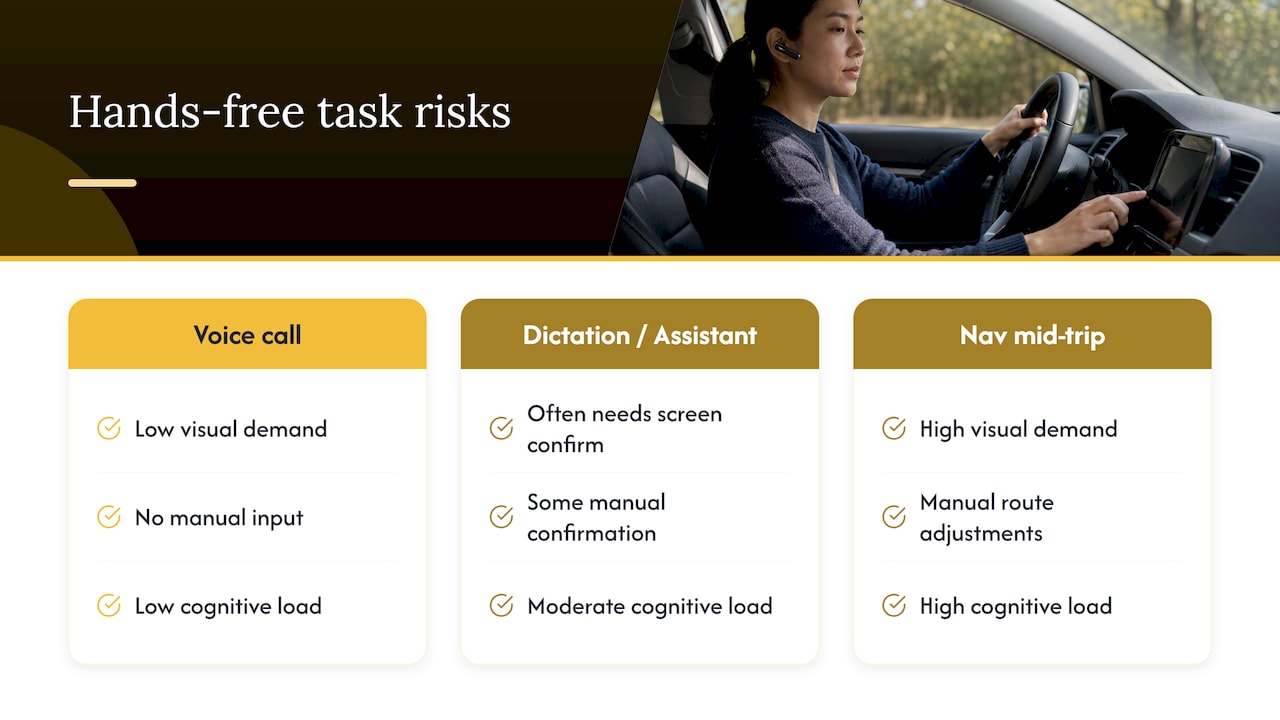
Not all hands-free activity carries equal risk. A voice-only phone call is the lowest-risk version of hands-free use because it asks for cognitive attention alone, without pulling your eyes toward a screen. Dictating a text or asking a voice assistant to check an app is a different story.
Voice-to-text and app interactions frequently require visual confirmation before you send anything, since most systems display a draft or read back a prompt on-screen. That step reintroduces the visual distraction that hands-free is supposed to eliminate. AAA’s research on hands-free distraction found that voice recognition systems often demand confirmation or retries, which increases glance time and manual interaction despite the hands-free label.
Navigation apps sit somewhere in between. Entering a destination before you drive is fine, but adjusting a route or replying to an app notification mid-trip reintroduces both visual and cognitive load at once. The safest rule is to treat any hands-free task that produces text on a screen, whether it’s a message, a search result, or a map update, as a visual task in disguise, and save it for when you’re stopped.
Why hands-free feels safer than it actually is
Drivers consistently rate hands-free calling as safer than handheld use, and that perception drives adoption: nearly 60% of drivers report using their phone in hands-free mode while driving. The problem is that the perception and the risk don’t move together.
Recent commentary on driver-assist and hands-free systems, including remarks from NTSB leadership covered in 2026, warns that convenience features can create a false sense of safety, encouraging drivers to divert more attention to phones or screens precisely because the system feels like it’s handling the load. That confidence gap matters because it shapes behavior: a driver who believes hands-free is safe is more likely to take a call in heavy traffic or attempt a longer conversation than one who understands the cognitive cost is the same either way. The gap between how safe hands-free feels and how safe it actually is may be the single biggest reason distraction remains common despite widespread awareness of the danger.
What drivers should actually prioritize
The evidence points to a conclusion that doesn’t get repeated often enough: the legal line between handheld and hands-free is not a safety line, and treating it as one is the most common mistake drivers make. Hands-free laws exist because manual and visual distraction are easier to police, not because hands-free conversations are safe.
If you take one thing from the research, let it be this: the goal isn’t finding the “safe” way to talk on the phone while driving. It’s reducing how often you try to combine driving with any secondary task at all, voice-based or otherwise. Pre-trip setup and pulling over for anything complex matter more than which hands-free gadget you buy. Technology can reduce manual fumbling, but it can’t buy back the attention a conversation takes from the road in front of you.
— Charles
Support safer roads with Drive With Care
Every donation helps fund distraction education, survivor support, and community pledge programs that turn awareness into habit change. Donate now to back that work directly.

- Individual gifts support survivor resources and driving school partnerships.
- Organizations can join as a Safety Supporter Partnership or larger partner tier to sponsor community programs.
Sources
- WHO — Mobile phone use: a growing problem of driver distraction
- NHTSA — Distracted driving
- FCC — Dangers of texting while driving
- The Conversation — Even hands-free phones and their apps cause dangerously distracted driving
FAQ
Is a hands-free phone safer than a handheld phone?
Not by much: WHO research finds crash risk rises about four times with phone use, and that risk looks similar for handheld and hands-free calls because both create cognitive distraction. Hands-free reduces manual and visual demands, but the mental load of a conversation stays the same.
What does “handheld” mean?
Handheld means physically holding a phone to talk, text, dial, or browse while driving. It’s the category most distracted driving laws target first, since it combines manual, visual, and cognitive distraction at once.
Can you use a handheld cell phone for calls while driving?
It depends entirely on where you’re driving: many jurisdictions ban handheld calls outright, including 30 U.S. states and Washington, D.C. that require hands-free use as of 2026. Always check the current statute for your specific location before assuming handheld calling is allowed.
What is considered a hands-free device?
A hands-free device lets you talk or issue commands without holding the phone, including Bluetooth headsets, speakerphone setups, and built-in vehicle systems with steering-wheel controls or voice commands. Even these systems can require occasional manual or visual attention when voice recognition fails or confirmation screens pop up.

